Introduction
Correct deductor details in a TDS return are essential for smooth compliance with the Income Tax Department. Errors in deductor name, address, or contact details can result in return rejection, notices, or processing delays.
The Income Tax Department allows deductors to correct deductor details by filing a revised TDS return through the TRACES portal. This blog explains what deductor details correction is and the step by step correction process.
What Is Deductor Details Correction in TDS?
Deductor details correction refers to rectifying incorrect organizational or personal information of the deductor mentioned in a filed TDS return.
These details identify who has deducted and deposited tax on behalf of the deductee.
Details That Can Be Corrected
The following deductor details can be corrected:
- Deductor name
- Deductor address
- Deductor type (Company, Firm, Individual, etc.)
- Responsible person details
- Contact number and email ID
⚠️ Note: TAN and PAN of the deductor cannot be changed.
When Is Deductor Details Correction Required?
Deductor details correction is required when:
- Name spelling is incorrect
- Address or PIN code is wrong
- Responsible person details have changed
- Contact details are outdated
- Deductor category is wrongly selected
Documents Required for Deductor Details Correction
- Original TDS return filed
- Consolidated (Conso) File from TRACES
- Updated deductor profile details
- DSC or EVC for validation


4
Step by Step Process for Deductor Details Correction
Step 1: Login to TRACES Portal
Login to the TRACES portal using your TAN and password.
Step 2: Request Consolidated (Conso) File
- Go to Downloads → Request for Conso File
- Select Form Type, Assessment Year, and Quarter
- Submit the request
Step 3: Download the Conso File
After approval, download the Consolidated File from TRACES.
Step 4: Open TDS Return Utility
Open RPU (Return Preparation Utility) or authorized TDS software and import:
- Original TDS return
- Consolidated file
Step 5: Select Deductor Details Correction
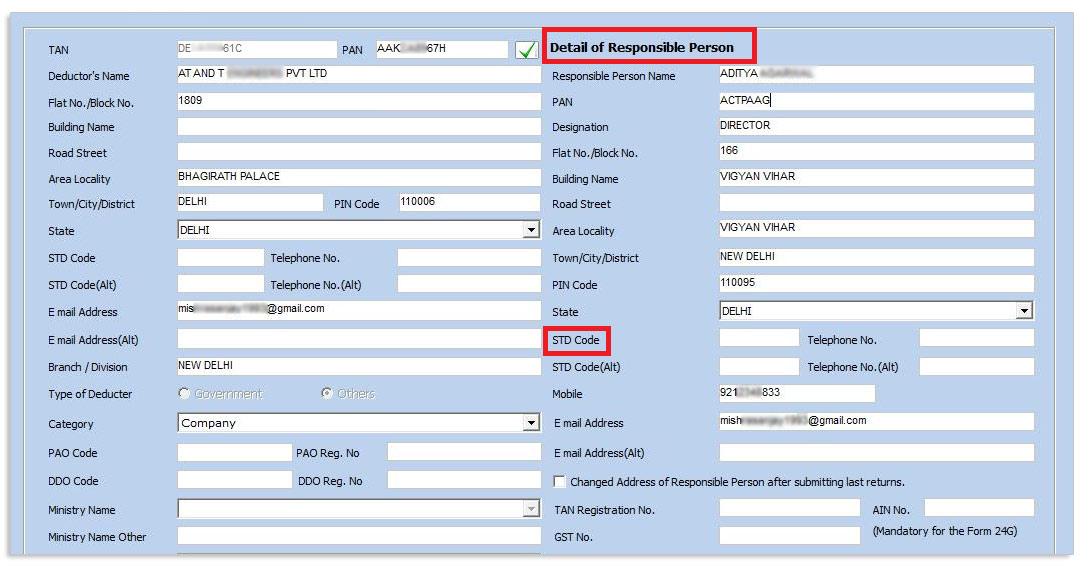
Choose Deductor Details Correction and update:
- Deductor name
- Address
- Responsible person details
- Contact information
Ensure accuracy before saving changes.
Step 6: Validate Revised TDS Return
Validate the corrected return using the latest FVU (File Validation Utility).
Step 7: Upload Revised TDS Return
Upload the revised file on the TDS CPC / NSDL portal using:
- Digital Signature Certificate (DSC), or
- Electronic Verification Code (EVC)
Step 8: Track Correction Status
Check the status on TRACES under Statement / Correction Status.
Time Limit for Deductor Details Correction
There is no statutory time limit, but corrections should be done as soon as the error is identified to avoid notices and processing delays.
Common Mistakes to Avoid
- Attempting to change TAN or PAN
- Using an incorrect Conso file
- Spelling errors in deductor name
- Uploading without validation
- Not tracking correction status
Benefits of Correct Deductor Details
- Smooth TDS processing
- Reduced compliance notices
- Faster return acceptance
- Improved departmental communication
Why Choose Saving Mantra?
- Expert TDS compliance professionals
- Quick and error-free corrections
- Complete TRACES support
- Affordable and reliable service
📞 Get your deductor details corrected hassle-free with Saving Mantra today.
Disclaimer
The information provided in this blog is for general informational purposes only and does not constitute tax, legal, or professional advice. Laws and procedures are subject to change. Readers are advised to consult a qualified tax professional before taking action.