Author: Financial Analyst

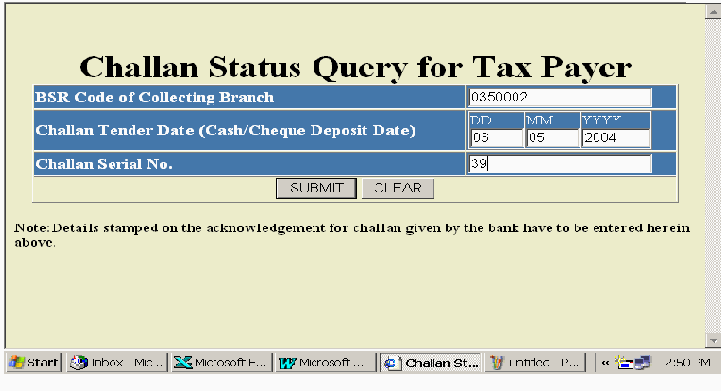
  • Challan Correction in TDS Return – Step by Step Guide

    Introduction

    Errors in TDS challan details are one of the most common reasons for defaults, notices, and mismatches in TDS returns. Incorrect challan amount, wrong CIN, or improper challan tagging can prevent TDS credit from reflecting correctly in Form 26AS.

    To resolve this, the Income Tax Department allows online challan correction through the revised TDS return process. This blog explains what challan correction is and the step by step online correction process.


    What Is Challan Correction in TDS Return?

    Challan correction refers to rectifying mistakes related to TDS payment challans already reported in a filed TDS return.

    These challans represent tax deposited with the government, and accurate mapping is essential for successful return processing.


    Challan Details That Can Be Corrected

    You can correct the following challan-related details:

    • Challan amount
    • BSR code
    • Date of deposit
    • Challan serial number
    • Challan to deductee tagging
    • Minor Head / Section mismatch

    ⚠️ Note: Challan correction is allowed only if the challan exists in OLTAS.


    When Is Challan Correction Required?

    Challan correction is required in situations such as:

    • Wrong challan amount reported
    • Incorrect BSR code or deposit date
    • Challan not matched with deductee entries
    • One challan used for multiple quarters incorrectly
    • Default notice for short payment

    Documents Required for Challan Correction

    • Original TDS return filed
    • Consolidated (Conso) File from TRACES
    • Challan Identification Number (CIN)
    • Bank challan copy
    • DSC or EVC for validation

    https://assets.learn.quicko.com/wp-content/uploads/2019/12/TRACES-Download-Conso-File.jpg
    https://tin.tin.proteantech.in/oltas/images/Image2.gif
    https://help.myitreturn.com/hc/article_attachments/16032803999641

    4


    Step by Step Online Process for Challan Correction

    Step 1: Login to TRACES Portal

    Login using your TAN and password on the TRACES portal.


    Step 2: Request Consolidated (Conso) File

    • Go to Downloads → Request for Conso File
    • Select Form Type, Assessment Year, and Quarter
    • Submit the request

    Step 3: Download Conso File

    Once approved, download the Consolidated File from TRACES.


    Step 4: Open TDS Return Utility

    Open RPU (Return Preparation Utility) or authorized TDS software and import:

    • Original TDS return
    • Consolidated file

    Step 5: Select Challan Correction

    Choose Challan Correction and update:

    • BSR code
    • Challan serial number
    • Deposit date
    • Challan amount
    • Re-tag challan with deductee records

    Ensure challan data matches bank records.


    Step 6: Validate the Revised Return

    Validate the revised return using the latest FVU (File Validation Utility) to remove errors.


    Step 7: Upload Revised TDS Return

    Upload the corrected file on the TDS CPC / NSDL portal using:

    • Digital Signature Certificate (DSC), or
    • Electronic Verification Code (EVC)

    Step 8: Track Challan Correction Status

    Check the correction status under Statement / Correction Status on TRACES.


    Time Limit for Challan Correction

    There is no fixed time limit, but corrections should be done as early as possible to avoid interest, late fees, and penalties.


    Common Mistakes to Avoid

    • Using a challan not appearing in OLTAS
    • Entering incorrect CIN details
    • Not re-tagging deductee entries
    • Using outdated Conso file
    • Uploading without validation

    Benefits of Correcting Challan Details

    • Proper TDS credit to deductees
    • Removal of default notices
    • Faster return processing
    • Accurate Form 26AS reflection

    Why Choose Saving Mantra?

    • Experienced TDS compliance experts
    • Accurate challan reconciliation
    • Quick resolution of defaults
    • End-to-end TDS correction support

    📞 Get your TDS challan corrections done smoothly with Saving Mantra today.


    Disclaimer

    The information provided in this blog is for general informational purposes only and does not constitute tax, legal, or professional advice. Tax laws and procedures may change from time to time. Readers are advised to consult a qualified tax professional before taking any action.

  • Deductor Details Correction in TDS Return – Guide

    Introduction

    Correct deductor details in a TDS return are essential for smooth compliance with the Income Tax Department. Errors in deductor name, address, or contact details can result in return rejection, notices, or processing delays.

    The Income Tax Department allows deductors to correct deductor details by filing a revised TDS return through the TRACES portal. This blog explains what deductor details correction is and the step by step correction process.


    What Is Deductor Details Correction in TDS?

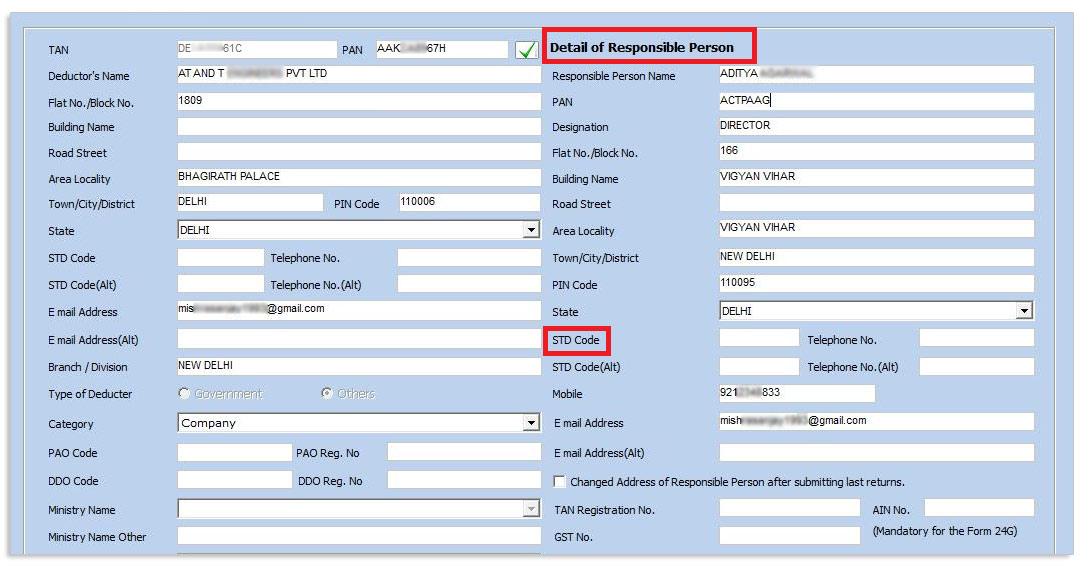
    Deductor details correction refers to rectifying incorrect organizational or personal information of the deductor mentioned in a filed TDS return.

    These details identify who has deducted and deposited tax on behalf of the deductee.


    Details That Can Be Corrected

    The following deductor details can be corrected:

    • Deductor name
    • Deductor address
    • Deductor type (Company, Firm, Individual, etc.)
    • Responsible person details
    • Contact number and email ID

    ⚠️ Note: TAN and PAN of the deductor cannot be changed.


    When Is Deductor Details Correction Required?

    Deductor details correction is required when:

    • Name spelling is incorrect
    • Address or PIN code is wrong
    • Responsible person details have changed
    • Contact details are outdated
    • Deductor category is wrongly selected

    Documents Required for Deductor Details Correction

    • Original TDS return filed
    • Consolidated (Conso) File from TRACES
    • Updated deductor profile details
    • DSC or EVC for validation

    https://assets.learn.quicko.com/wp-content/uploads/2019/12/TRACES-Download-Conso-File.jpg
    https://media.licdn.com/dms/image/v2/D5622AQGNnrjQfoFeJw/feedshare-shrink_2048_1536/B56ZpM8tg3JwAw-/0/1762227575536?e=2147483647&t=NPF1sjx_I0n08inO1D2Sl15YNx3ND2Dykk-q-T4OtOY&v=beta
    https://blog.kdksoftware.com/wp-content/uploads/2019/08/5.jpg

    4


    Step by Step Process for Deductor Details Correction

    Step 1: Login to TRACES Portal

    Login to the TRACES portal using your TAN and password.


    Step 2: Request Consolidated (Conso) File

    • Go to Downloads → Request for Conso File
    • Select Form Type, Assessment Year, and Quarter
    • Submit the request

    Step 3: Download the Conso File

    After approval, download the Consolidated File from TRACES.


    Step 4: Open TDS Return Utility

    Open RPU (Return Preparation Utility) or authorized TDS software and import:

    • Original TDS return
    • Consolidated file

    Step 5: Select Deductor Details Correction

    Choose Deductor Details Correction and update:

    • Deductor name
    • Address
    • Responsible person details
    • Contact information

    Ensure accuracy before saving changes.


    Step 6: Validate Revised TDS Return

    Validate the corrected return using the latest FVU (File Validation Utility).


    Step 7: Upload Revised TDS Return

    Upload the revised file on the TDS CPC / NSDL portal using:

    • Digital Signature Certificate (DSC), or
    • Electronic Verification Code (EVC)

    Step 8: Track Correction Status

    Check the status on TRACES under Statement / Correction Status.


    Time Limit for Deductor Details Correction

    There is no statutory time limit, but corrections should be done as soon as the error is identified to avoid notices and processing delays.


    Common Mistakes to Avoid

    • Attempting to change TAN or PAN
    • Using an incorrect Conso file
    • Spelling errors in deductor name
    • Uploading without validation
    • Not tracking correction status

    Benefits of Correct Deductor Details

    • Smooth TDS processing
    • Reduced compliance notices
    • Faster return acceptance
    • Improved departmental communication

    Why Choose Saving Mantra?

    • Expert TDS compliance professionals
    • Quick and error-free corrections
    • Complete TRACES support
    • Affordable and reliable service

    📞 Get your deductor details corrected hassle-free with Saving Mantra today.


    Disclaimer

    The information provided in this blog is for general informational purposes only and does not constitute tax, legal, or professional advice. Laws and procedures are subject to change. Readers are advised to consult a qualified tax professional before taking action.

  • Step by Step Process for Salary Details Correction

    Introduction

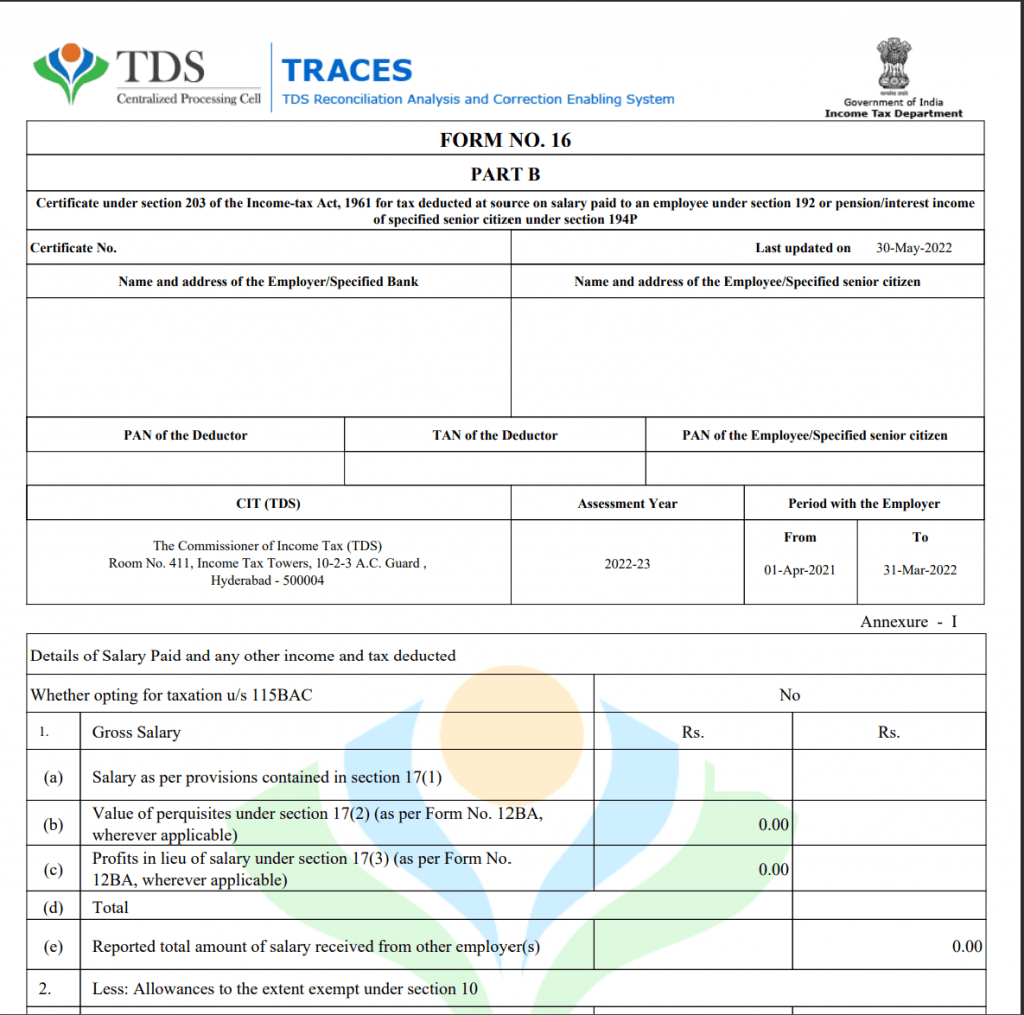
    Errors in salary details while filing TDS Return (Form 24Q) can lead to mismatches in Form 26AS, employee complaints, and income tax notices. The Income Tax Department allows employers to correct salary details by filing a revised TDS return through the TRACES portal.

    This blog explains the step by step process of corrections in salary details, documents required, correction types, and best practices to ensure smooth compliance.


    What Is Salary Details Correction in TDS?

    Salary details correction refers to modifying incorrect information reported under Form 24Q, such as:

    • Gross salary
    • Exempt allowances
    • Deductions under Chapter VI-A
    • Taxable income
    • TDS deducted or deposited

    These corrections ensure accurate tax credit to employees.


    When Is Salary Correction Required?

    Salary details correction is required in cases like:

    • Incorrect gross or taxable salary
    • Wrong exemption or deduction amount
    • Incorrect perquisite value
    • Excess or short TDS deduction
    • Mismatch in Form 16 and Form 26AS

    Types of Salary Corrections in Form 24Q

    1. Salary Amount Correction
    2. Taxable Income Correction
    3. Chapter VI-A Deduction Correction
    4. Perquisite Value Correction
    5. TDS Amount Correction

    Documents Required for Salary Details Correction

    • Original Form 24Q filed
    • Consolidated (Conso) File from TRACES
    • Employee salary structure
    • Proof of deductions and exemptions
    • DSC or EVC for validation

    https://static.wixstatic.com/media/f0e777_b1f3897b2d4b46958305fdb1b58843af~mv2.jpeg/v1/fill/w_1000%2Ch_668%2Cal_c%2Cq_85%2Cusm_0.66_1.00_0.01/f0e777_b1f3897b2d4b46958305fdb1b58843af~mv2.jpeg
    https://static.wixstatic.com/media/f120be_3dd8be001b884a7084d1e094c8fca73c~mv2.png/v1/fill/w_980%2Ch_1069%2Cal_c%2Cq_90%2Cusm_0.66_1.00_0.01%2Cenc_avif%2Cquality_auto/f120be_3dd8be001b884a7084d1e094c8fca73c~mv2.png
    https://www.registrationwala.com/storage/app/public/posts/July2024/Form-16-part-b-1024x1015%20%281%29.png

    4


    Step by Step Process for Corrections in Salary Details

    Step 1: Login to TRACES Portal

    Login to the TRACES portal using your TAN credentials.


    Step 2: Request Consolidated (Conso) File

    • Navigate to Downloads → Request Conso File
    • Select Form 24Q, Assessment Year, and Quarter
    • Submit the request

    Step 3: Download Approved Conso File

    Once approved, download the Consolidated File for the relevant quarter.


    Step 4: Open TDS Return Utility

    Use RPU (Return Preparation Utility) or authorized TDS software and import:

    • Original return data
    • Conso file

    Step 5: Select Salary Details Correction

    Choose Salary Details Correction and update:

    • Gross salary
    • Exemptions
    • Deductions
    • Taxable income
    • TDS deducted

    Ensure values match payroll records.


    Step 6: Validate the Revised Return

    Validate the corrected return using the latest FVU (File Validation Utility) to generate an error-free file.


    Step 7: Upload Revised Form 24Q

    Upload the validated file on the TDS CPC / NSDL portal using:

    • Digital Signature Certificate (DSC), or
    • Electronic Verification Code (EVC)

    Step 8: Track Correction Status

    Check the status under Statement / Correction Status on TRACES.


    Time Limit for Salary Corrections

    There is no fixed deadline, but corrections should be completed before return processing to avoid penalties, interest, or employee grievances.


    Common Mistakes to Avoid

    • Using outdated Conso file
    • Incorrect deduction limits
    • Mismatch between Form 16 and payroll
    • Ignoring FVU validation errors
    • Uploading without DSC/EVC

    Benefits of Correcting Salary Details

    • Accurate Form 16 issuance
    • Correct reflection in Form 26AS
    • Reduced risk of notices
    • Better employee trust and compliance

    Why Choose Saving Mantra?

    • Payroll and TDS experts
    • Error-free salary corrections
    • Fast turnaround time
    • Complete compliance support

    📞 Get your salary TDS corrections done professionally with Saving Mantra.


    Disclaimer

    The information provided in this blog is for general informational purposes only and does not constitute tax, legal, or professional advice. Tax laws and procedures are subject to change. Readers are advised to consult a qualified tax professional before taking any action.

  • Step by Step Process to Revise TDS Return in India

    Introduction

    Filing a TDS Return accurately is crucial for compliance under the Income Tax Act, 1961. However, mistakes such as incorrect PAN details, challan errors, or wrong deduction amounts are common. To fix these issues, the Income Tax Department allows deductors to revise TDS returns online.

    This blog explains the step by step process to revise TDS return, correction types, documents required, and important tips to avoid rejection.


    What Is a Revised TDS Return?

    A Revised TDS Return is filed when errors are found in an already submitted original TDS return. It helps correct details so that deductees receive proper credit in Form 26AS and compliance remains intact.


    When Can You Revise a TDS Return?

    You can revise a TDS return in the following cases:

    • Incorrect PAN of deductee
    • Wrong challan details
    • Incorrect TDS amount
    • Wrong assessment year or quarter
    • Missing or additional deductee entries

    There is no limit on the number of revisions, but each revision must be accurate.


    Types of TDS Corrections

    1. PAN Correction – Correct invalid or missing PAN
    2. Challan Correction – Modify challan amount, BSR code, or date
    3. Deductee Details Correction – Change TDS amount or name
    4. Salary Detail Correction – Applicable for Form 24Q
    5. Add / Delete Deductee Records

    Documents Required to Revise TDS Return

    • Original TDS Return file
    • Latest Consolidated (Conso) File
    • Justification Report (if applicable)
    • Valid Digital Signature Certificate (DSC) or EVC
    • TRACES login credentials

    https://assets.learn.quicko.com/wp-content/uploads/2019/12/TRACES-Download-Conso-File.jpg
    https://assets.learn.quicko.com/wp-content/uploads/2019/12/TRACES-Download-Justification-Report.jpg
    https://cleartax-media.s3.amazonaws.com/finfo/wg-utils/cms-tool/93252dfb-a70b-41f6-bd81-61078246c34c.png

    4


    Step by Step Process to Revise TDS Return

    Step 1: Login to TRACES Portal

    Visit the TRACES website and log in using your TAN credentials.


    Step 2: Request Consolidated (Conso) File

    • Go to Downloads → Request for Conso File
    • Select Form Type, Assessment Year, Quarter
    • Submit request and wait for approval

    Step 3: Download Conso File

    Once approved, download the Consolidated File from TRACES.


    Step 4: Open TDS Return Utility

    Use RPU (Return Preparation Utility) or authorized TDS software and import:

    • Original return
    • Conso file

    Step 5: Make Required Corrections

    Choose correction type:

    • PAN
    • Challan
    • Deductee
    • Salary details

    Ensure data accuracy to avoid rejection.


    Step 6: Validate the Revised Return

    • Validate using File Validation Utility (FVU)
    • Generate revised FVU file

    Step 7: Upload Revised TDS Return

    Upload the validated file on the TDS CPC / NSDL portal using:

    • DSC, or
    • EVC (as applicable)

    Step 8: Track Status

    Check the revised return status under Statement Status on TRACES.


    Time Limit for Revising TDS Return

    There is no specific due date for revision, but it should be done before processing to avoid notices, interest, or penalties.


    Common Mistakes to Avoid

    • Uploading incorrect Conso file
    • PAN mismatch errors
    • Incorrect challan tagging
    • Not validating with latest FVU
    • Ignoring justification report defaults

    Benefits of Revising TDS Return

    • Correct credit to deductees
    • Avoid notices and penalties
    • Smooth Form 26AS reflection
    • Improved compliance score

    Why Choose Saving Mantra?

    • Expert TDS compliance support
    • Error-free TDS revision
    • Fast processing
    • End-to-end assistance

    📞 Get professional help to revise your TDS return today with Saving Mantra.


    Disclaimer

    The information provided in this blog is for general informational purposes only and does not constitute legal, tax, or professional advice. Tax laws are subject to change. Readers are advised to consult a qualified tax professional before acting on the information.

  • Step-by-Step Guide: Update Deductee PAN

    Step-by-Step Process to Update PAN of Deductee

    PAN (Permanent Account Number) is a key identifier for TDS compliance. Incorrect PAN details of a deductee can lead to mismatches, rejection of TDS returns, and penalties. Here’s a detailed guide to update PAN in TDS records.


    1. Identify the PAN Mismatch

    Common reasons to update PAN:

    • Deductee’s PAN entered incorrectly in TDS return (Form 24Q or 26Q)
    • Deductee has changed PAN due to reissue
    • Typographical errors while entering PAN in payroll or accounting software

    Identifying the mismatch ensures you take corrective action accurately.


    2. Gather Required Information

    Before updating PAN, collect:

    • Deductee’s correct PAN
    • TAN of the deductor (employer or payer)
    • Deductee details: name, category, and payment type
    • Original TDS payment and challan details

    3. Login to the NSDL / TIN Portal

    1. Visit the NSDL TDS e-filing portal.
    2. Login using TAN and password.
    3. Navigate to ‘Correction Statement / Update Deductee PAN’ section.

    4. File a Correction Statement

    • Select the TDS return and quarter containing the error.
    • Update the deductee PAN along with other required details (name, amount, section code).
    • Validate all entries carefully to avoid further mismatches.
    • Submit the correction statement.

    5. Verify Acknowledgment

    • After submission, download the Correction Acknowledgment Receipt.
    • This serves as proof of PAN update for TDS compliance.

    6. Update Payroll / Accounting Records

    • Ensure that payroll software, accounting books, or TDS registers reflect the correct PAN.
    • Future TDS filings should use the updated PAN to prevent mismatches.

    7. Important Tips

    • Always verify deductee PAN before filing TDS returns to reduce corrections.
    • Keep digital and physical records of correction statements and acknowledgment receipts.
    • Submit corrections before the annual TDS return deadline to avoid penalties.

    Conclusion

    Updating a deductee’s PAN in TDS records is essential for error-free compliance and smooth TDS reporting. Following the step-by-step process ensures accuracy, avoids penalties, and maintains proper records for audit and assessment purposes.


    Disclaimer: This blog is intended for general informational purposes only. It does not replace professional tax advice. For personalized guidance, consult a qualified tax consultant.

  • Step-by-Step Guide: TDS Correction in Challan

    Step-by-Step Process for TDS Correction in Challan

    Errors in TDS challans, such as wrong PAN, TAN, or deposited amount, are common but must be corrected to avoid interest and penalties. Here’s a complete guide on correcting TDS challan mistakes.


    1. Identify the Error

    Common mistakes in TDS challans include:

    • Wrong TAN or PAN
    • Incorrect TDS amount
    • Wrong section code
    • Wrong quarter or financial year

    Identifying the exact error is critical before initiating correction.


    2. Gather Required Details

    You will need:

    • Challan Identification Number (CIN)
    • Deductor TAN and PAN
    • Deductee PAN
    • Financial year and quarter of TDS deposit
    • Original challan deposit details

    3. Login to the TIN/NSDL Portal

    1. Visit the TIN NSDL website.
    2. Login using your TAN and password.
    3. Navigate to ‘Correction in TDS Challan’ section.

    4. Submit Challan Correction

    • Select the challan to be corrected using CIN, TAN, PAN, and quarter.
    • Enter the correct details for PAN, TAN, section code, or deposited amount.
    • Ensure all corrections are accurate and complete.

    5. Generate Correction Acknowledgment

    • After submission, the portal generates a Correction Acknowledgment Receipt.
    • Download and save this receipt for records.
    • This acknowledgment serves as proof of correction for TDS compliance.

    6. File Revised TDS Return (If Required)

    • If the correction affects the TDS return, prepare a revised TDS return using Form 24Q or 26Q.
    • Upload the revised file on the NSDL TDS e-filing portal.
    • Keep the acknowledgment of both challan correction and revised TDS return for audit purposes.

    7. Important Tips

    • Always verify TDS deposits and PAN details before filing to minimize errors.
    • Maintain digital and physical copies of all corrections and acknowledgments.
    • Corrections should be done as soon as the error is identified to avoid interest or penalties under Sections 201 and 234E.

    Conclusion

    Correcting mistakes in TDS challans is straightforward if you follow the proper process. Accurate correction ensures compliance, avoids penalties, and maintains smooth TDS reporting for both deductors and deductees.


    Disclaimer: This blog is intended for general informational purposes only. It does not replace professional tax advice. For personalized guidance, consult a qualified tax consultant.

  • Step-by-Step Guide: TDS Form 16 & 16A Download

    Step-by-Step Process to Download TDS Form 16 / 16A

    TDS Form 16 and 16A are essential certificates issued to employees or deductees, summarizing the tax deducted and deposited by the employer or deductor. Correctly downloading and storing these forms ensures transparency and compliance. Here’s a step-by-step guide.


    1. Understand Form 16 and Form 16A

    • Form 16: Issued for TDS on salary. Contains details of income, TDS deducted, and tax paid.
    • Form 16A: Issued for TDS on non-salary payments like contractor payments, rent, professional fees, or interest.

    Knowing the difference ensures you download the correct form for the right transaction.


    2. Gather Required Details

    Before downloading, ensure you have the following:

    • TAN of the deductor (your employer or company)
    • PAN of the deductee (employee/vendor)
    • Financial year for which TDS was deducted
    • TDS payment challan details (for verification)

    3. Login to the TDS Portal

    1. Visit the NSDL TDS e-filing portal.
    2. Login using your TAN and password.
    3. Navigate to ‘TDS Certificates / Form 16 / Form 16A’ section.

    4. Download Form 16 / 16A

    • For Form 16:
      1. Select the relevant financial year.
      2. Click Generate Form 16.
      3. Download the PDF and save it securely.
    • For Form 16A:
      1. Select Quarter and Financial Year.
      2. Choose the deductee’s PAN from the list.
      3. Click Download Form 16A.
      4. Save the PDF for recordkeeping.

    5. Verify Details

    After downloading, always verify:

    • Deductee’s name and PAN
    • Employer/deductor details
    • TDS amount deducted and deposited
    • Financial year and assessment year

    Any discrepancy should be reported immediately to the deductor for correction.


    6. Store Forms Safely

    • Keep all TDS certificates (Form 16 / 16A) for at least 6 years.
    • These certificates are essential for filing ITR, audits, and future references.

    7. Tips for Employers

    • Ensure all TDS returns (Form 24Q / 26Q) are filed before generating certificates.
    • Use accounting software or NSDL utilities for bulk certificate generation.
    • Verify all details before sharing with employees or deductees.

    Conclusion

    Downloading TDS Form 16 and 16A is a straightforward process if you follow the steps systematically. Ensure you verify all details, download certificates timely, and maintain records for compliance and audit purposes.


    Disclaimer: This blog is intended for general informational purposes only. It does not replace professional tax advice. For personalized guidance, consult a qualified tax consultant.

  • Step-by-Step Guide: TDS Return Form 24Q & 26Q

    Step-by-Step Process to File TDS Return (Form 24Q & 26Q)

    Tax Deducted at Source (TDS) is a crucial aspect of income tax compliance for businesses. Filing TDS returns correctly ensures you stay compliant and avoid penalties. Here’s a complete step-by-step guide for Form 24Q and Form 26Q filing.

    1. Understand Forms 24Q and 26Q

    • Form 24Q: For TDS on salaries. Employers use this form to report TDS deducted from employees’ salaries.
    • Form 26Q: For TDS on payments other than salaries, such as contractor payments, rent, professional fees, and interest.

    Knowing the right form ensures accurate reporting and smooth tax compliance.


    2. Collect Required Information

    Before filing, gather the following details:

    • PAN of deductee (employee or vendor)
    • TAN of the deductor (your business)
    • Details of TDS deducted (salary or non-salary)
    • Payment and deduction dates
    • Challan details for deposited TDS

    3. Prepare TDS Statements

    Step A: Using Excel Utilities or Software

    1. Download the Form 24Q / 26Q Excel utility from the NSDL TDS portal.
    2. Fill in company details, TAN, PAN, and financial year.
    3. Add deductee details with PAN, salary/payment amount, and TDS deducted.
    4. Verify all entries using the ‘Validate’ button to check errors.

    Step B: Using Accounting or Payroll Software

    • Most payroll/accounting software (Tally, Zoho Books, QuickBooks, SAP) generate TDS return files automatically.
    • Export the file in .txt format for submission.

    4. Submit TDS Return Online

    1. Visit the NSDL TDS e-filing portal.
    2. Login using your TAN and password.
    3. Go to ‘Upload TDS Return’ and select Form 24Q or 26Q.
    4. Upload the validated .txt file generated from utility/software.
    5. Confirm submission and download the Acknowledgment Receipt (ITR-V) for your records.

    5. Rectify Errors (If Any)

    • If the portal rejects your file due to errors, check the validation sheet or software log.
    • Correct errors (PAN mismatch, deductee details, or challan number) and re-upload.
    • Keep the revised acknowledgment for compliance records.

    6. Deadlines & Penalties

    FormQuarterDue Date
    24QQ1-Q431st July (annual)
    26QQ131st July
    26QQ231st October
    26QQ331st January
    26QQ431st May

    Penalty: Late filing or incorrect returns can attract penalties under Section 234E and interest under Section 201/202.


    7. Keep Records Safely

    • Store Acknowledgment Receipts, challans, and TDS statements securely for at least 6 years.
    • These records are mandatory during audits and income tax assessments.

    Conclusion

    Filing TDS returns using Form 24Q & 26Q may seem complex initially, but following these steps simplifies the process. Use reliable software, double-check all details, and submit on time to stay fully compliant and avoid penalties.


    Disclaimer: This blog is intended for general informational purposes only. It does not replace professional tax advice. For personalized guidance, consult a qualified tax consultant.

  • TDS Return Outside India (Form 27Q): Step Guide

    What Is Form 27Q?

    Form 27Q is a quarterly TDS return used to report:

    • Payments made to non-residents (NRIs)
    • Payments to foreign companies
    • TDS deducted on income other than salary

    It captures details of the deductor, deductee, nature of payment, tax deducted, and challans.


    When Is Form 27Q Applicable?

    Form 27Q must be filed when:

    • Payment is made to a non-resident or foreign entity
    • Income is taxable in India
    • TDS is deducted under relevant sections such as 195

    Common payments covered:

    • Royalty
    • Fees for technical or professional services
    • Interest
    • Commission and consultancy fees

    TDS Rate for Foreign Payments

    • TDS rates depend on:
      • Nature of payment
      • Income Tax Act provisions
      • Applicable DTAA (Double Taxation Avoidance Agreement)
    • Lower DTAA rates can be applied if:
      • Tax Residency Certificate (TRC) is available
      • Form 10F and declarations are obtained

    Step-by-Step Process of Filing TDS Return Outside India (Form 27Q)

    Step 1: Obtain TAN

    Ensure the deductor has:

    • Valid Tax Deduction and Collection Account Number (TAN)

    TAN is mandatory for TDS deduction and return filing.


    Step 2: Identify Taxability and TDS Rate

    Before deduction:

    • Check if income is taxable in India
    • Identify applicable section (generally Section 195)
    • Apply DTAA benefit if documents are available

    Incorrect rate application can lead to notices.


    Step 3: Deduct TDS at Time of Payment

    TDS must be deducted:

    • At the time of credit or
    • At the time of payment
      Whichever is earlier.

    Step 4: Deposit TDS Using Challan

    Deposit TDS using:

    • Challan ITNS 281

    Provide correct:

    • TAN
    • Section code
    • Assessment year
    • Nature of payment

    Step 5: Prepare Form 27Q Return

    Prepare quarterly TDS return containing:

    • Deductor details
    • Non-resident deductee details
    • Country of residence
    • Nature of remittance
    • Amount paid and tax deducted

    Special care is needed for country and code selection.


    Step 6: Validate Return File

    Before upload:

    • Validate Form 27Q using File Validation Utility (FVU)
    • Ensure no structural or data errors

    Only validated files can be uploaded.


    Step 7: Upload Form 27Q

    Upload the validated return:

    • On the TDS return filing portal
    • Using deductor credentials

    Acknowledgment is generated after successful upload.


    Step 8: Download and Issue TDS Certificate

    After return processing:

    • Download Form 16A from TRACES
    • Issue Form 16A to the non-resident deductee

    This serves as proof of tax deduction.


    Due Dates for Form 27Q Filing

    QuarterDue Date
    Apr – Jun31st July
    Jul – Sep31st October
    Oct – Dec31st January
    Jan – Mar31st May

    Timely filing avoids late fees and penalties.


    Penalty for Late or Incorrect Filing

    DefaultConsequence
    Late filing₹200 per day (max TDS amount)
    Late deductionInterest @ 1% per month
    Late paymentInterest @ 1.5% per month
    Incorrect returnPenalty up to ₹1,00,000

    Common Mistakes in Form 27Q Filing

    • Ignoring DTAA benefits
    • Incorrect country or nature-of-payment code
    • Mismatch in challan details
    • Delay in issuing Form 16A

    Expert review reduces compliance risk.


    Conclusion

    Filing TDS Return Outside India using Form 27Q is a critical international tax compliance for Indian payers making cross-border payments. Correct taxability assessment, timely deduction, accurate filing, and DTAA compliance ensure smooth transactions and avoid heavy penalties.


    Disclaimer

    This article is for informational purposes only and does not constitute legal, tax, or professional advice. TDS rates, DTAA applicability, forms, and procedures are subject to change as per law and notifications. Readers are advised to consult qualified tax professionals before undertaking any foreign remittance or TDS compliance.

  • TDS Payment Process: Step-by-Step Guide in India

    What Is TDS Payment?

    TDS payment refers to the deposit of tax deducted from payments made to another person with the central government within prescribed timelines. The deductor acts as a tax collector on behalf of the government.


    Who Is Required to Pay TDS?

    TDS payment is applicable to:

    • Employers deducting TDS on salary
    • Businesses and professionals making specified payments
    • Companies, LLPs, firms, and eligible individuals
    • Buyers deducting TDS on property or rent

    Applicability depends on the nature and threshold of payment.


    Common Payments Covered Under TDS

    • Salary (Section 192)
    • Contractor payments (Section 194C)
    • Professional fees (Section 194J)
    • Rent (Section 194I)
    • Interest (Section 194A)
    • Commission and brokerage (Section 194H)

    Step-by-Step Process of TDS Payment

    Step 1: Identify Applicable TDS Section

    Before deduction, determine:

    • Correct section of Income Tax Act
    • Applicable threshold limit
    • Correct TDS rate

    Incorrect section selection may lead to notices.


    Step 2: Deduct TDS at Correct Time

    TDS must be deducted:

    • At the time of credit to payee’s account or
    • At the time of actual payment

    Whichever is earlier, as per law.


    Step 3: Calculate TDS Amount

    Compute:

    • TDS = Applicable rate × Payment amount

    If PAN is not provided by the payee, higher TDS may apply.


    Step 4: Generate Challan for TDS Payment

    TDS is paid using:

    • Challan ITNS 281 (for most TDS payments)

    Details required:

    • TAN of deductor
    • Assessment year
    • Section code
    • Nature of payment

    Step 5: Pay TDS Online

    Deposit TDS through:

    • Net banking
    • Authorized bank portals

    Payment confirmation and challan receipt are generated instantly.


    Step 6: File TDS Return

    After payment:

    • File quarterly TDS return (Forms 24Q, 26Q, 27Q, as applicable)
    • Upload details of deductees and challans

    Return filing ensures credit to deductee.


    Step 7: Issue TDS Certificate

    Provide TDS certificates to deductees:

    • Form 16 – Salary TDS
    • Form 16A – Non-salary TDS

    Certificates must be issued within prescribed timelines.


    Due Dates for TDS Payment

    Month of DeductionDue Date
    April to February7th of next month
    March30th April

    Delayed payment attracts interest and penalties.


    Interest and Penalty for Late TDS Payment

    DefaultConsequence
    Late deductionInterest @ 1% per month
    Late paymentInterest @ 1.5% per month
    Late return filingFee ₹200 per day (max TDS amount)

    Regular monitoring avoids financial losses.


    Common Mistakes in TDS Payment

    • Wrong section or rate selection
    • Incorrect TAN or PAN entry
    • Delay in deposit or return filing
    • Non-issuance of TDS certificates

    Professional compliance management helps prevent errors.


    Conclusion

    TDS payment is a critical tax responsibility that requires timely deduction, accurate payment, and proper reporting. A systematic step-by-step approach ensures smooth compliance, avoids penalties, and builds trust with vendors, employees, and authorities.


    Disclaimer

    This article is for informational purposes only and does not constitute legal, tax, or professional advice. TDS rates, sections, due dates, and procedures are subject to change as per applicable laws and notifications. Readers are advised to consult qualified tax professionals before making any compliance or payment decisions.